Contents
Making Reservations With Siri
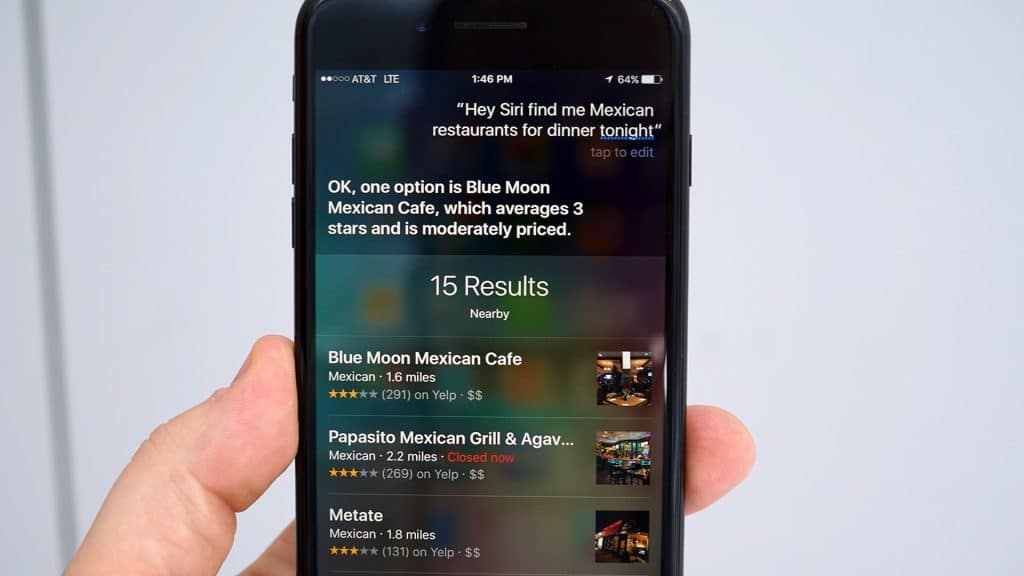
Making reservations for dining out can be a tedious process, but not when you have Siri by your side. You can ask Siri to “Make a reservation at an Italian restaurant for Sunday at 6 pm”, and she’ll do the rest. Using Yelp and OpenTable, Siri will provide you with a list of nearby restaurants that match your criteria, along with their ratings, distances, and available reservations. This feature simplifies the reservation process and saves you the hassle of searching for restaurants and available slots.
Once Siri provides you with the list of restaurants, you can select the one you’re interested in to get more information. You’ll see the restaurant’s hours, contact information, and a map showing its location. If you’re ready to make the reservation, just click “Make Reservation”, and your device will direct you to OpenTable. This seamless integration of services makes planning your dining experiences effortless and enjoyable.

Siri can also serve as your personal navigator, easily guiding you to your destination. With commands like “Take me home”, “Take me to work”, or “Take me to contact name or nickname work/home/etc.” Siri can provide you with directions in an instant. This feature is handy for daily commutes, quick errands, or even long road trips. Instead of manually typing in addresses, you can simply ask Siri to guide you.
While Siri uses Apple Maps for navigation, the convenience, and hands-free experience it offers make it a valuable tool for any journey. Whether you’re driving, walking, or using public transportation, Siri’s navigation feature can help you reach your destination efficiently. So, the next time you’re unsure about the route, just ask Siri to guide you.
Discovering Overhead Planes With Siri
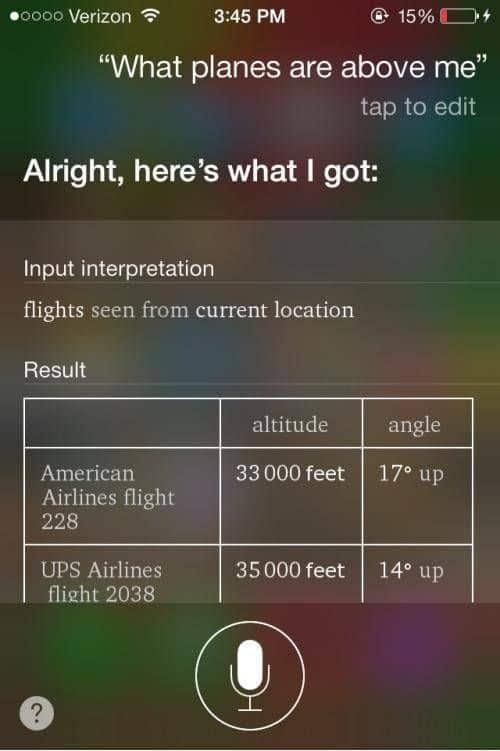
One of the more fun and lesser-known features of Siri is her ability to identify overhead planes. By asking Siri, “What planes are overhead,” she’ll use WolframAlpha to provide you with information about the planes currently flying over your location. This includes the airline, flight number, type of plane, altitude, angle, and more. While this feature might not have practical applications, it’s a fun way to satisfy your curiosity and learn more about the world above you.
This feature can be particularly interesting for aviation enthusiasts or those simply intrigued by the idea of identifying overhead planes. It’s also a great way to engage children in learning about planes and flight. So, the next time you’re gazing at the sky and spot a plane, remember that Siri can tell you more about it.
Setting Location-Based Reminders With Siri

One of the most useful features of Siri is her ability to set location-based reminders. You can ask Siri to “remind me to whatever when I get wherever,” and if you have addresses listed in your Contacts, she’ll remind you to do things when your GPS gets close to the contact address. This feature can be a lifesaver for busy individuals who need to remember tasks based on their location, such as picking up groceries on the way home or dropping off a package when near the post office.
Moreover, this feature is not limited to just home and work addresses. You can set reminders for any location that’s in your Contacts. For example, you can ask Siri to remind you to congratulate your friend when you arrive at their house or to buy tickets when you pass by the theater. This makes Siri a powerful tool for managing your tasks and ensuring you don’t forget anything important.
Controlling Music With Siri

If you’re a music lover, Siri can enhance your listening experience by controlling your music for you. Whether your music is stored on your device or you use iTunes Radio, you can ask Siri to “Play”, “Pause”, “Skip”, or even specify artists, genres, playlists, and shuffling. For example, you can say, “Play The Black Keys shuffled”, “Don’t play this song again”, “Play some blues”, or “Shuffle my driving playlist”. This feature allows you to control your music without having to touch your device, which can be particularly useful when you’re driving, cooking, or doing any other activity that requires your hands.
In addition to controlling playback, Siri can also help you discover new music. You can ask her to play the top songs from a particular genre, year, or even a specific artist. If you hear a song you like, you can ask Siri to add it to your library or a specific playlist. With Siri, your music experience becomes more interactive and personalized.
Make The Most Of These Siri Hacks!
Siri is more than just a voice assistant; it’s a powerful tool that can simplify many aspects of your life. From converting measurements and checking sports scores to making reservations and setting location-based reminders, Siri’s capabilities go far beyond the basics. Hopefully, these Siri hacks have revealed some new ways for you to use this versatile tool. So, the next time you pick up your iPhone, remember that Siri is there to assist you, whether you need to accomplish a task or just want to have some fun!