Contents
System Services Location Settings
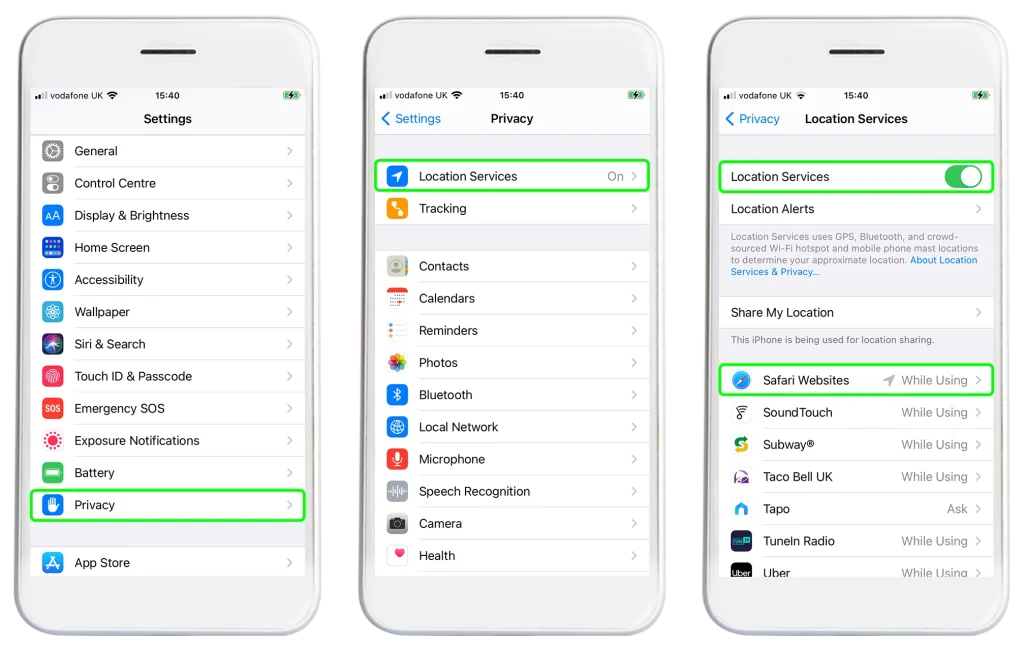
Delving deeper into the iPhone’s settings, one uncovers a realm of system services location settings often overlooked. These settings govern how the core system services access and utilize location data. It ranges from settings that enhance basic functionalities like finding a lost phone to others that improve the user experience by providing location-based suggestions. However, not all of these services are essential, and disabling some could lead to enhanced privacy and better battery longevity.
By toggling off non-essential system services location settings, a user not only takes a step towards securing personal information but also conserves battery life. This act of disabling is not about compromising functionality but about making informed choices. Understanding which system services are crucial for one’s usage and which are not, lays the foundation for this customization. It’s about optimizing the device settings to align with individual preferences and usage patterns.
Benefits Of Tweaking Location Settings
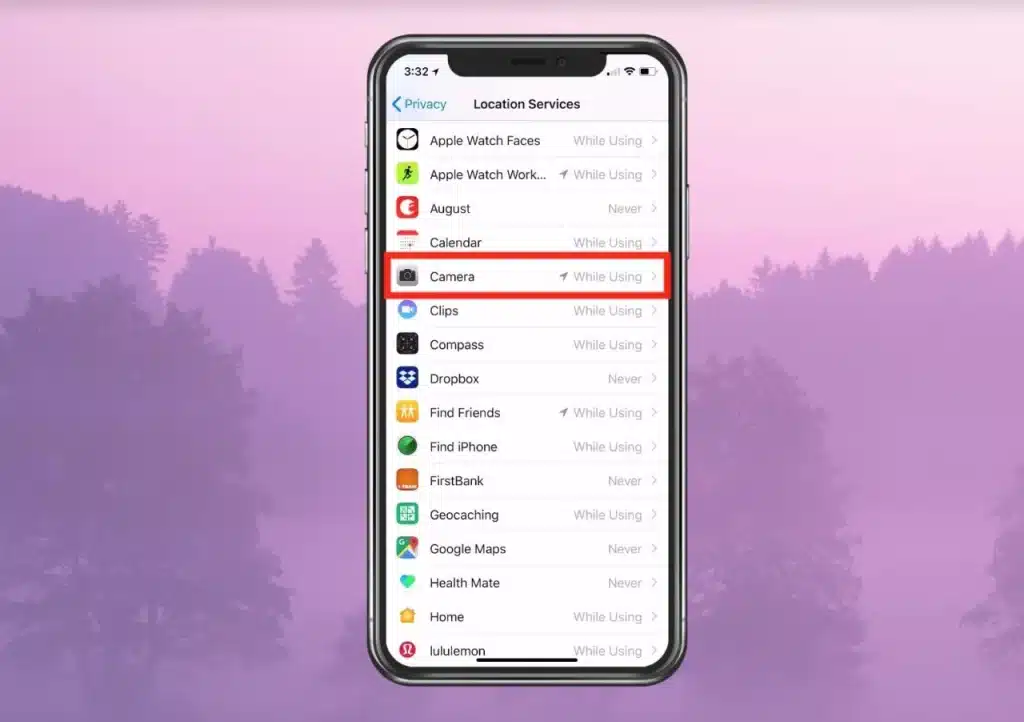
The effort invested in tweaking location settings pays dividends in the form of enhanced privacy and battery conservation. As the control over location access tightens, the risk of personal information exposure diminishes. Moreover, with fewer apps and system services incessantly accessing location data, the battery life sees a notable extension. This is a significant payoff, especially for individuals who are always on the move and rely heavily on their mobile devices.
The nuances of adjusting location settings extend beyond just privacy and battery life. It cultivates a sense of control and personalization, making the iPhone more of an asset tailored to individual needs and less of a liability. The ripple effect of this simple act is profound. It fosters a smarter, more conscious interaction with the device, paving the way for a balanced and optimized user experience.
Checking App Behavior

Monitoring how frequently apps access location data is an eye-opener. It unveils the behind-the-scenes operations, shedding light on which apps are heavy on location data usage. By observing this behavior, one can make informed decisions on whether the level of access granted is necessary or excessive. This observation is instrumental in making necessary adjustments, ensuring that location access aligns with the actual necessity.
A routine check on app behavior concerning location access is a prudent practice. It’s not a one-time endeavor but a continuous effort to ensure optimal settings. The insights gained from these checks empower the user to make timely adjustments, fostering a dynamic interaction with the device. Over time, this practice cultivates a well-balanced relationship between user convenience, privacy, and battery longevity.
Additional Tips
Embarking on the journey of location settings management, one may come across third-party apps that offer a more granular control. These apps provide a detailed overview of which applications access location data and how frequently. They often come with intuitive interfaces that simplify the process of managing location permissions. Moreover, they might provide additional features like historical location data access, which can be enlightening. It’s an avenue worth exploring for those keen on having meticulous control over their location settings.
It is also important to keep in mind that regular review of location settings is an essential practice, not a one-off task. Over time, as new apps get installed, and old ones get updated, their location access requirements might change. Being proactive in reviewing these settings ensures that they remain optimized. Additionally, it is wise to explore the location settings of updated apps in order to grasp any new permissions that may have been introduced. This regular review instills a discipline of conscious usage, making the device a tool rather than a threat to personal privacy.
The Bottom Line
The realm of iPhone location settings is extensive yet navigable. The steps towards tweaking these settings usher in a myriad of benefits, notably enhanced privacy and battery conservation. It’s a proactive step towards making the iPhone a personalized asset, fine-tuned to individual preferences and needs. So, take the reins and venture into the location settings, make informed adjustments, and experience the enhancement in device performance and personal privacy. It’s about taking control, understanding the implications, and making smart, informed decisions for a balanced and secure mobile experience.