Contents
Siri Shortcuts
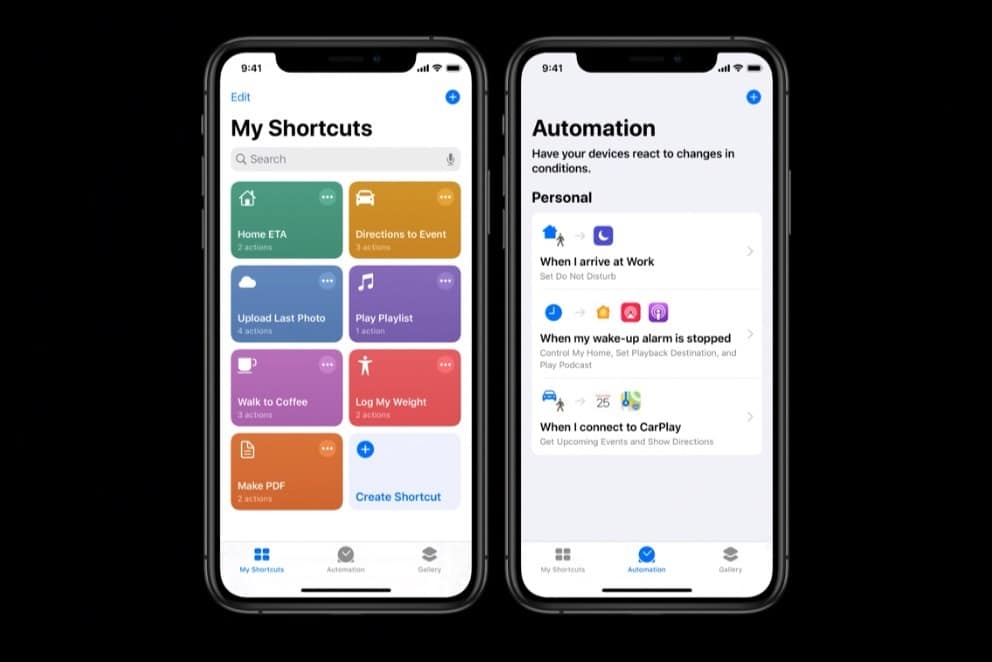
Siri Shortcuts take your productivity to the next level by allowing you to create custom commands for a series of actions. For example, you can create a “Good Morning” shortcut that turns on your lights, reads the news, and starts brewing your coffee if you have smart home devices. To set up a Siri Shortcut, you’ll need to go to the Shortcuts app on your device and follow the steps to create a new shortcut.
Once your shortcuts are set up, activating them is as simple as saying the custom phrase you’ve assigned. This feature is particularly useful for complex tasks that involve multiple steps. Instead of manually performing each action, you can bundle them together into a single Siri Shortcut. This not only saves time but also makes your daily routines more streamlined.
Siri And Home Automation

If you’re into smart home technology, Siri can be your best friend. With the right setup, you can control a wide range of smart home devices, from thermostats and lights to security cameras. For example, you can say, “Hey Siri, set the thermostat to 72 degrees,” or “Hey Siri, turn off the living room lights,” and Siri will execute these commands instantly.
However, it’s essential to consider security when using Siri for home automation. Make sure to set up secure passwords and use two-factor authentication for your smart home apps. This ensures that only authorized users can control your devices, keeping your home safe and secure.
Siri And Entertainment

Beyond productivity and home automation, Siri can also be your go-to for entertainment. Want to listen to your favorite playlist? Just say, “Hey, Siri, play my workout playlist,” and you’re good to go. Siri can also find movies, provide sports scores, and even play trivia games with you. It’s like having an entertainment hub right at your fingertips.
The key to a seamless entertainment experience with Siri is to know the proper commands and phrasing. For example, instead of saying, “Find a movie,” you can be more specific and say, “Hey Siri, find action movies released in 2020.” The more specific you are, the better Siri can assist you in finding exactly what you’re looking for.
Troubleshooting Common Issues

Even the most advanced technology can encounter hiccups, and Siri is no exception. You might find that Siri sometimes misunderstands your commands or fails to execute an action. In such cases, the first step is to check your device’s microphone and internet connection. A poor connection or obstructed microphone can often be the culprit behind these issues.
If basic troubleshooting doesn’t resolve the problem, consider diving into Siri’s settings to reset or reconfigure it. You can also consult Apple’s support forums or contact customer service for more specialized assistance. Remember, the goal is to make Siri an effective tool for you, and sometimes, that requires a bit of troubleshooting to get things just right.
You’re Ready To Master All Of Siri’s Features!
You’ve now journeyed through the ins and outs of mastering Siri, Apple’s virtual assistant that promises to make your life easier and more organized. From setting it up on your device to using both basic and advanced commands, Siri offers a range of functionalities designed to streamline your daily routines and tasks. As Siri continues to evolve, staying updated on its latest features will only enhance your experience. So why wait? Start making the most of this incredible technology today, and discover how much simpler and more enjoyable life can be!



